
“How do you model the UI?” is one of the most asked questions in Event Modeling. For years, the answer I gave felt like a workaround. It never really felt right. Turns out the answer was always in front of me.
How Do You Model the UI? I Never Had a Good Answer. Until Now.
There’s one question I hear in almost every Event Modeling workshop.
“How do you model the UI?”
It usually comes up somewhere on day one. We’ve just walked through the first few slices, the information flow is starting to make sense, and then someone, typically from the UX side, looks at the screens on the board and asks it.
For years, I didn’t have an easy answer. At least not one I liked and felt confident giving.
Event Modeling Already Includes Screens
Let’s start with what Event Modeling is.
With Event Modeling, you tell the story of a system. You follow the information flow. Where does information enter the system, what happens to it, and where does it show up again?
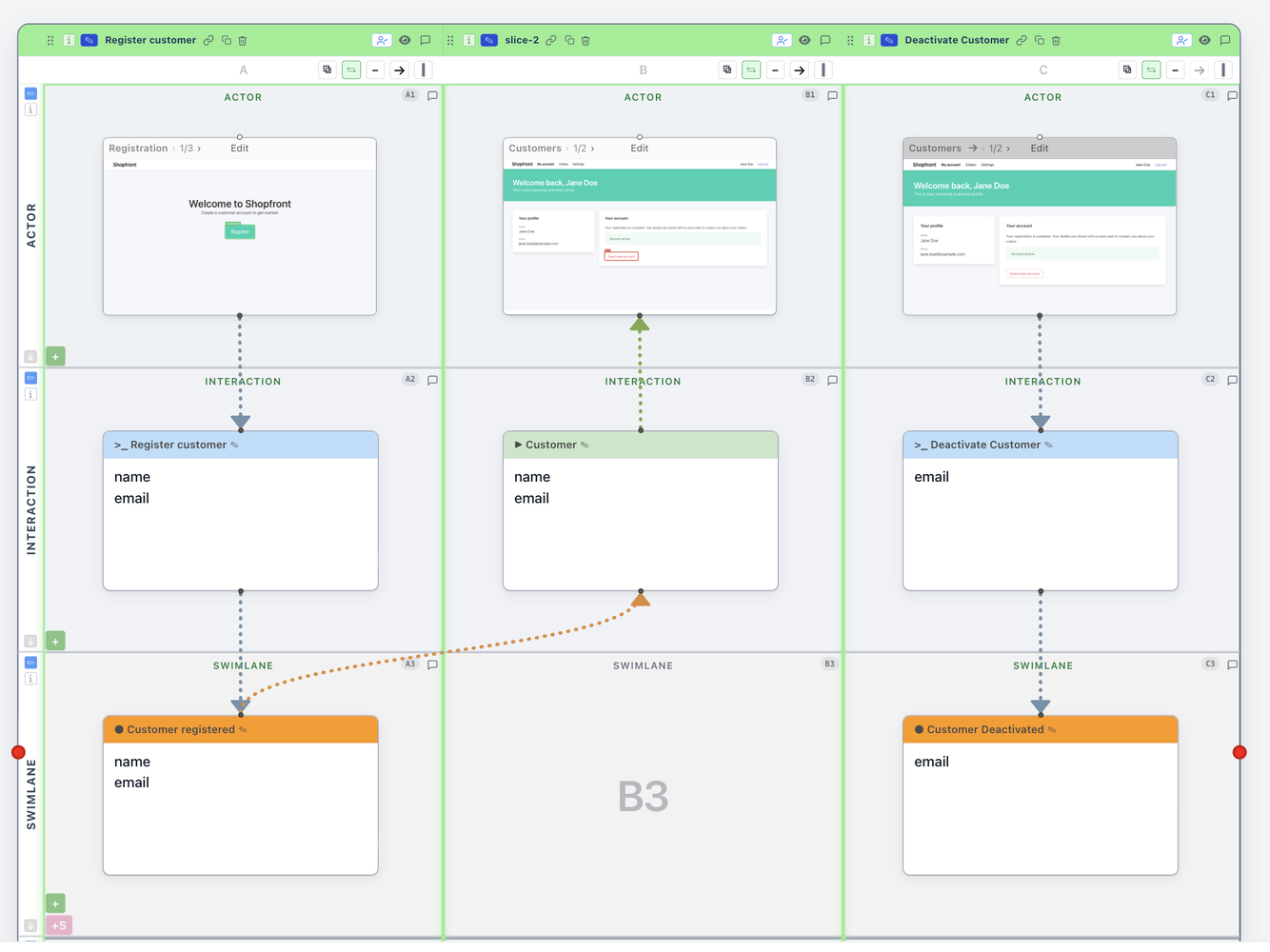
And that story explicitly includes screens and UX. It’s a really important part of Event Modeling. Screens are everywhere on an Event Model. They’re one of the things that make it so easy for business people to read. You don’t need to understand commands or events to understand “the user fills in this form, and later sees this list.”
Sometimes in Event Modeling workshops we focus exclusively on screens, because this is what works best for some teams.
So screens are not the problem.
The problem is that UX can get very detailed, very fast.
A Simple Registration, in Detail
Let’s take a simple example. A user registers for something.
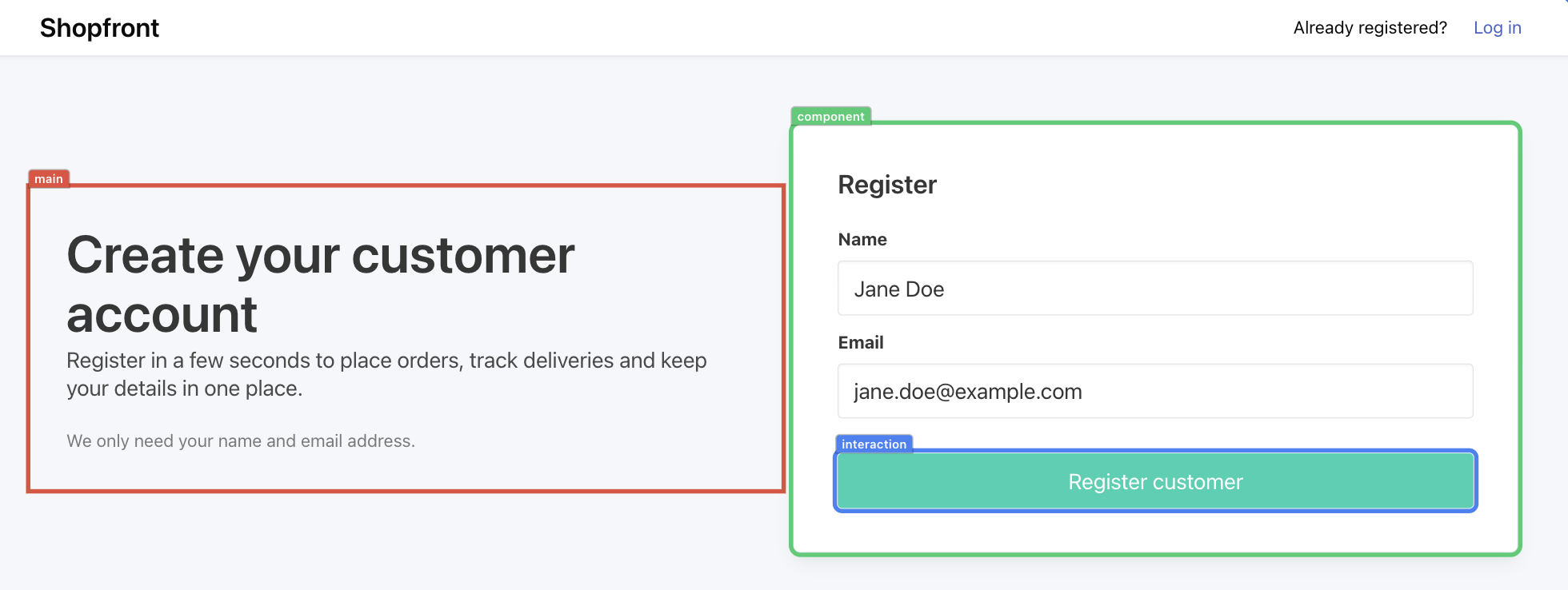
Here’s what actually happens in the UI:
- Before anything is shown, permissions are checked. Is this user even allowed to register?
- The user sees a button.
- The button opens a modal.
- The modal shows the registration form.
- The form is submitted.
- A success message appears.
Six steps. And that’s a simple case.
Now look at those steps from the perspective of information flow. Which of them actually matters?
Most of the time only one. The form. The rest is “UX” that comes later.
The form is where information enters the system. The submit is where the state change happens. That’s what becomes the command and the event on the board.
The button, the modal, the success message, they’re UX-only interactions. They matter enormously to the person using the system. But for the information flow itself, the form is typically what is modeled.
But People Want Both
So if the form is enough, why do people keep asking?
Because to describe a system as a whole, you need both. And teams want both.
The information flow tells you what the system does. The UX tells you how it feels to use it. A designer, a frontend developer, a product owner thinking about the user journey, they all need that second part.
Now Event Modeling itself allows you to express this today without adding anything. But somehow this never felt right to me.
The Advice I Gave for Years
So what did I tell teams?
Usually one of two things.
“Use a dedicated screen for each step in the Event Model.” The button gets a screen, the modal gets a screen, the success message gets a screen.
Or: “Use Given / When / Then just for the UI.” Describe the UI behavior as specifications, the same way you describe business rules.
Both work, technically. But for most teams, they didn’t work well. For complex UIs, the Event Model gets bloated quite quickly, to a point where you can no longer easily distinguish information flow from UX. It just required a lot of discipline to get it right.
The reason might be that both approaches put two different audiences on one board. The Event Model is supposed to be readable by everyone. Business experts, developers, testers. The moment you add every modal and every button state, the timeline floods with detail that most of the people in the room don’t care about. The story gets harder to follow.
And for me personally, Event Modeling is, first and foremost, about information flow. Adding all those UI interactions to the timeline mixes two levels of detail that I think don’t belong at the same level.
I know not everybody agrees with this. Yesterday we started a discussion about this in the Event Modeling community, and “thank god”, there are a lot of different views. So here is mine.
Why I Started Building EM-Studio
First - being able to answer those questions well is one of the core reasons I started building EM-Studio.
Over the last years, there were a handful of questions in Event Modeling that I simply couldn’t answer easily. Not because the method was wrong, but because the tools we had couldn’t express the answer.
“How do you model the UI?” was one of them.
First Step: Multi-Page Screens
A few months ago, we took the first step in the tooling. We added multi-page screens.
A single screen on the board can now hold several UI states, and you can navigate between them. That helped already. You could express what happened in the UI.
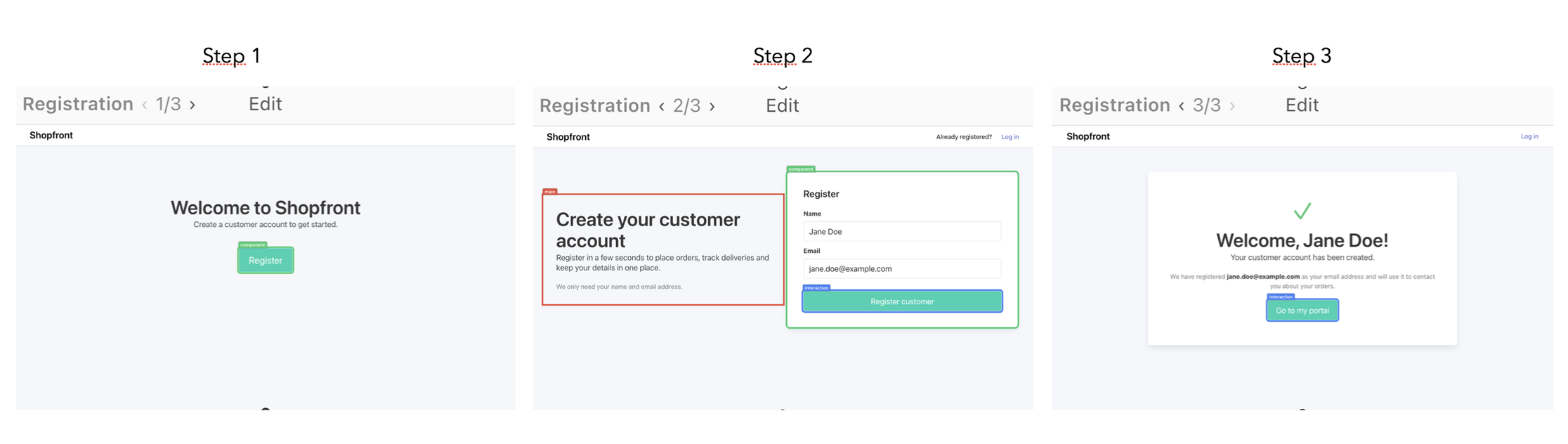
In the registration example, that means the button, the modal and the success message all live inside one screen, in one slice. You click into it and step through the states.
The timeline stays clean. The information flow is still the main story. And the UX detail is right there, one click deeper, for everyone who needs it.
That already solved a big part of the problem.
What Was Still Missing
But it didn’t solve all of it.
The pages were there. The behavior between them wasn’t. Understanding what the UX looked like required some fantasy, or you had to look in different places like Figma.
Why does this button open that modal? When does a certain component show up, and when is it hidden? What happens when I filter a list? Which state does the UI end up in after the form is submitted, and what does it depend on?
There was no easy way to describe how the pieces connect.
And that’s exactly the part designers and frontend developers care about most. And I think it deserves a place in the Event Model.
Every Tool Does It Differently, None of It Felt Right to Me
For me it was clear, I wanted to tackle this.
Some tools provide a declarative way to describe the UI. Some do it by pure configuration. Some rely on raw markdown.
They all have their reasons. But none of them felt right to me. Each one meant introducing yet another language, yet another way of thinking, next to the Event Model.
We Already Had the Perfect Tool
And then it clicked. We already have the perfect tool for this.
A modal opening is a state change. A filter being applied is information. A component appearing because some condition is true is a state being projected into something you can see.
It’s exactly what we model every day. Just inside the UI.
So why not use Event Modeling for it?
Experience Modeling
That’s what EM-Studio now provides.
For each slice in EM-Studio, you can now define what I call an Experience Model. An Event Model for the UI.
An Experience Model is still an Event Model - no new notation, no new concepts. I just like naming it “Experience Modeling”, so we know exactly what we are discussing.
This is one of the very rare occasions that I’m deliberately adding something to Event Modeling itself in the tool. Well, kind of. As it’s still Event Modeling, it’s a small addition, but still. I don’t do this lightly, in this case I think it’s a valuable addition.
The main Event Model stays what it always was. It tells the story of the system and follows the information flow. The registration form is there, the command, the event, the read models.
And inside the slice, one level deeper, the Experience Model describes how the UI behaves. The button being clicked, the modal opening, the form being submitted, the success message being shown. Same building blocks, same way of thinking, same language. Just a different level of detail.
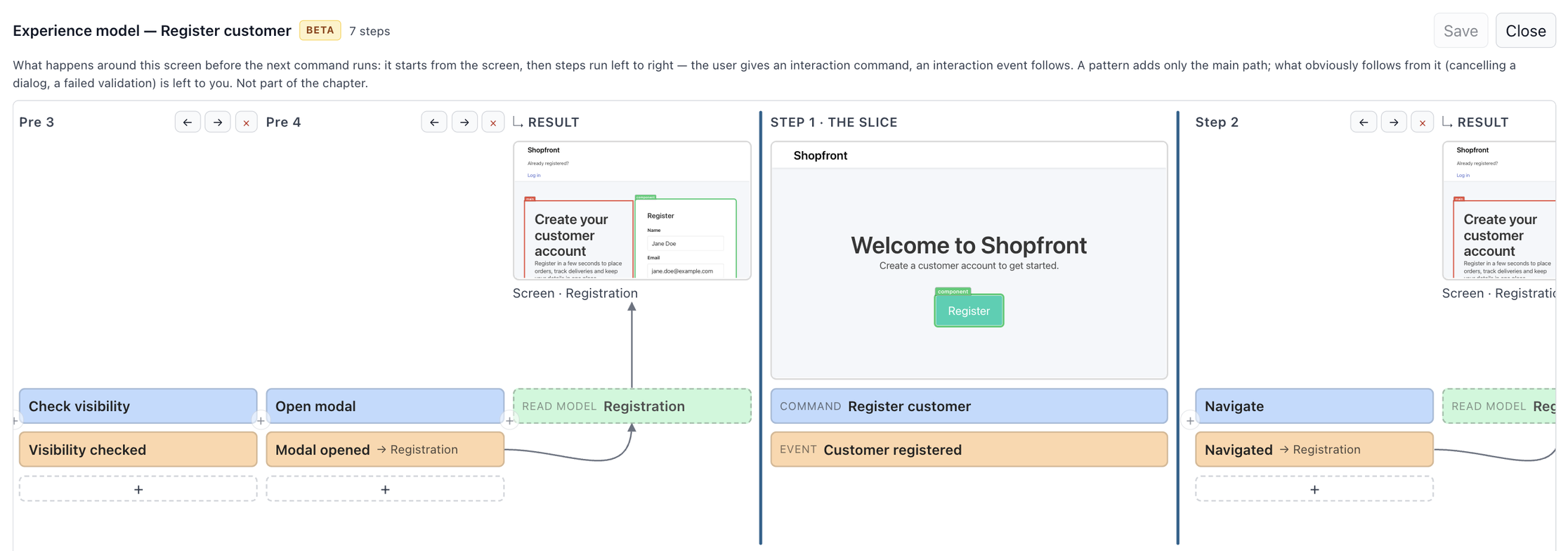
Two levels. One language. Like “zooming” in on a certain screen.
I want to give credit where it’s due. The term “Experience Model” I heard for the first time from my friend Martin Rosén-Lidholm, who has been experimenting with this for some months with his teams. We discussed this a few weeks ago as well, when we met in Copenhagen.
It’s not published yet in EM-Studio, but it’s planned for the next few days (I’ll keep you posted). You’re reading about it here first.
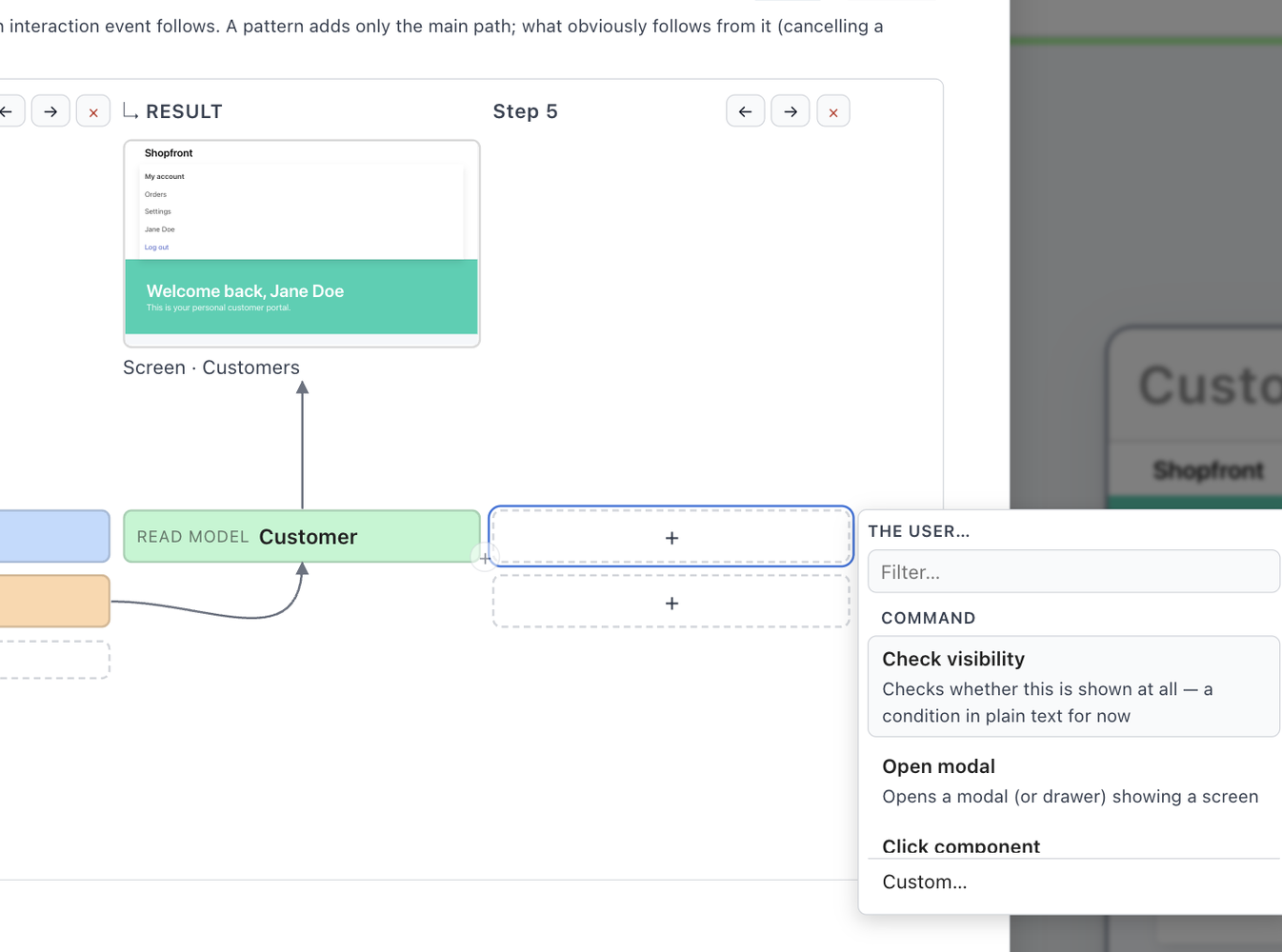
And as usual - each feature in EM-Studio is built agent-first. Agents can read and understand Experience Models. And they can use them to build UIs in the Build Kits. But they can also provide them - so you can just describe in the chat in EM-Studio (or using your voice) what you want the UX to be like - and your agent will provide the Experience Model for you. It feels very natural.
What I Need From You
For years, my answer to “how do you model the UI?” felt like a workaround.
Put more screens on the board. Write more specifications. Accept that two levels of detail end up mixed together.
Now the answer is simple. You model the UI the same way you model everything else.
With Event Modeling. Just one level deeper.
Experience Modeling is designed to be completely optional. If you don’t actively use it, you will never see it - and you can keep doing what you always did. It’s just an additional tool in the tool belt.
But I’ll need your feedback on this. Does that make sense? Does that solve a problem? Until now it’s just an attempt to solve one of the last big mysteries in Event Modeling.
EM-Studio is the digital place for humans and agents to collaborate. Solving the hard parts of Spec-Driven Development with software teams.
Links
Hands-On Event Modeling Workshop
Book a Call Today
Want to talk through how Event Modeling could work for your team or project? Let’s have a quick, no-pressure conversation.